
Frequently Asked Questions
Everything you need to know about our services, orders & payments.
You can use all types of public and private links (invite link) when placing an order, but you should know a few things when placing an order.
Public link
If you use the public link to place an order, your order will be checked (check whether the member has been sent or not and also refill) based on the channel statistics and premium section only.
This section shows how many premium members your channel has, but you need to know that this section is not updated instantly and only on search update days (this section is updated at the same time as Telegram search and once every 8-12 days). If you need a refill or your order has not been sent, your order will be checked only on the search update day and based on the number of premiums of your channel (at the time of checking, the number of premiums of the channel itself or other orders will not be taken into account, and if your order is 1000 members If it is premium and you have 1000 premium members, this means that your order has been completed and there has been no drop.
Invite link:
At the time of placing an order, if you use the invite link, Telegram has made it possible for you to see how many people have joined your channel through this link, and it will also show you the list of these people, so you can subscribe to premium. View users and know how many people have joined
So, on this basis, using Invite Link is the best option because it provides the possibility to check the order and refill in the moment
But you need to know some very important points:
- One: Never use the same link in two orders, Telegram allows you to create unlimited links without changing the main address of the channel or group, so it is better to create a new link for each order.
If you do not do this and use the same link in several orders, at the time of refilling, you will find the cheapest order and it will be refilled, and in this case, you will lose. - Two: Do not put any restrictions on the link when creating the invite link
- Three: If the link is invalid, changed or unavailable, there is no possibility to find anything
If you use the public link in your order, your refill will be done based on the number of your premium channels.
We will check the premium part of your channel statistics and refill the order based on that (it will not be refilled based on the start count orders of the premium members in any way)
Photo of the premium section in channel statistics:
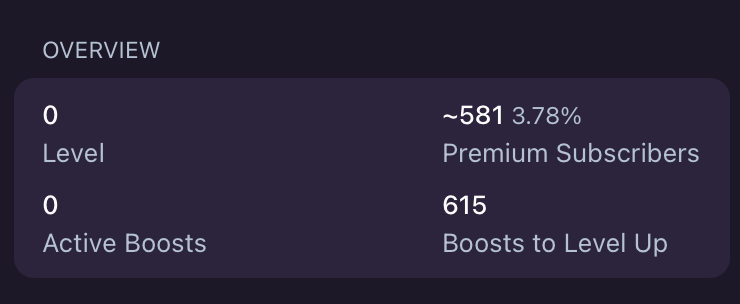
But you should know that if you use 1000 premium members and your channel has 1000 premium members, we will not refill it (even if you already had it or bought it, because it is not possible to check it, that's why we always recommend Use the invite link so that you can always see the information separately (because you have the 1000 premium members that you ordered)
Very important: you should know that the Telegram statistics section of the premium section is not updated immediately when the Telegram search is updated, this section is also updated)
We cannot refill public link orders before the search is updated, even if the refill period of your order is about to end.
We recommend you to use Invite Link to avoid this problem
Very important: we check the orders that were used from the public link only once between the search updates, and for the next check, you have to wait for the next search update, because if we refill your order or send it again, your channel statistics section will When the search is not updated, it will not be updated, so you have to wait for the next update (there are no exceptions).
Currently, the only way to track bot start orders is to check the number of users in your bot
Unfortunately, there is no other way to check the sent account
If the amount of your order is 1000 pieces and at the time of ordering the desired robot has 1000 members, if the number of members is 2000, this means that your order has been completed (if you have obtained members in other ways, you can contact us Is not )
I have placed an order through the referral link, but it has not been sent, why?
Your order has been sent but your referral number has not increased for two reasons
1: Only the services that have the referral link written in their name or description will be accepted, it will increase your referral, otherwise they will join the robot directly.
Two: You should know that each account can become someone else's referral in a robot only once. If someone has used our accounts in this robot before you, the accounts will start the robot, but they will not become your referral.
If you search for a topic in the Telegram section, it will first show you the channels you are a member of, but below that, it will show you the suggested channels that are ranked based on the Telegram algorithm. This section will only change when Telegram search is updated
Telegram updates the search section every 8-14 days (sometimes it takes longer and may reach 30 days) and the ratings change.
And when the search is updated and the ranking of the channels is given, the ranking remains constant until the next update
For orders with invite link:
If you have used the invite link at the time of your order, just send us a screen video of the users who have joined the order link so that we can refill it (note that everything is based on the number of users who have joined the link, so to Never use the same link in two orders, Telegram allows you to create unlimited new links without changing the main link of the channel or group, so create a new link for each order.
For orders with public link:
If you have used a public link in your order, your order will be checked based on the number of premium channels you have
We will check the premium part of your channel statistics and refill the order based on that (it will not be refilled based on the start count orders of the premium members in any way)
But you should know that if you use 1000 premium members and your channel has 1000 premium members, we will not refill it (even if you already had it or bought it, because it is not possible to check it, that's why we always recommend Use the invite link so that you can always see the information separately (because you have the 1000 premium members that you ordered)
But if the premiums have been subscribed earlier and the number of premiums available in your channel or group is less, we will refill it.
For the bot start service, you can use the bot id (user name) as well as the bot link
Can I use a referral link?
Of course, but you should know that in two cases, the accounts sent to the robot will be your subcategory (referral).
- One: It should be written in the name or description of the service that the referral link is accepted, otherwise only users will start your robot and they will not be included in your collection.
- Two: You should know that each user can become a sub-set (referral) of one person in each robot. If another user has placed an order for that robot before you, our accounts will not be sub-set again.
If you have used the invite link in your order, the order will be refilled based on the number of accounts joined through the order link.
As you know, when you use invite link, Telegram allows you to see how many people have joined the channel through the link you want.
When you request a refill, you must send a screenshot of the link (like the example below), we will check it and refill it)
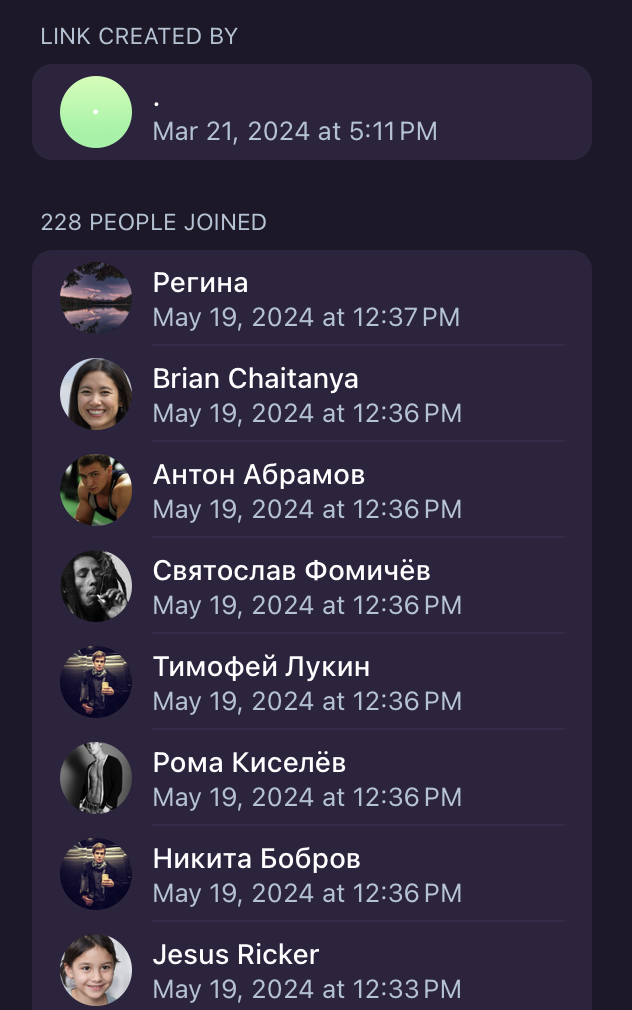
Things you must know:
- 1: Never use the same link in two orders, Telegram allows you to create unlimited links without changing the main address of the channel or group, so it is better to create a new link for each order.
If you do not do this and use the same link in several orders, at the time of refilling, you will find the cheapest order and it will be refilled, and in this case, you will lose. - 2: Under no circumstances should the link be invalidated before the end of the warranty period or a restriction should be applied to it (such as Join Request).
- 3: Do not change or delete the link or use normal services (member fake) at the same time. Below we will check it based on the number of joined accounts
- 4: Do not use the link you used in the order anywhere else, because we check the order based on the number of joined accounts, and if a user has joined your channel through this link or in another way, we will not be able to reach it. and it cannot be separated (if you have ordered 1000 premium members and 1000 people have joined the link, your refill request will be rejected anyway)
Telegram allows you to create unlimited links, so it is better to create a new link for every order or work
If your premium order has not been sent, you must take different actions according to your order link
📍 If you have used Invite Link
Just go to the invite links section and send a screenshot of the number of users who have joined the link so that we can check it (note that our check is based on the number of users who have joined the link, if you have ordered 1000 members and If your link has 1000 members, it means your order has been completed
Therefore, do not use the same link in two orders, Telegram allows you to create unlimited links without changing the main address of the channel or group, so it is
better to create a new link for each order.
📍 If you used a public link when placing an order
If you use the public link to place an order, your order will be checked based on the channel statistics and premium section only.
This section shows how many premium members your channel has, but you need to know that this section is not updated instantly and only on search update days (this section is updated at the same time as Telegram search and once every 8-12 days). If you need a refill or your order has not been sent, your order will be checked only on the search update day and based on the number of premiums of your channel (at the time of checking, the number of premiums of the channel itself or other orders will not be taken into account, and if your order is 1000 members If it is premium and you have 1000 premium members, this means that your order has been completed and there has been no drop.
The channel statistics section (premium section) is not updated instantly
And only on the days when the search is updated, this section is updated
When will the search be updated?
Telegram search is updated almost every 8-14 days, but sometimes it may take longer (up to 30 days).
If you used the invite link at the time of your order, then if the refill is not sent to you within 48 hours after the refill request, you must send a new screenshot of the link and inform the support to restart your refill order.
(Note that you must send the screenshot of the same day, if the screenshot is old, the request will be rejected without checking)
If you have used the public link, you should wait until the search is updated and the channel statistics section of the premium section is updated, and then send a screenshot of this section (until the search is updated, no changes will be applied to this section by Telegram and no There is no way for us to find out if the refill has been sent or not, so you have to wait until the search update day, and this case has no exceptions, the search update time is every 8-14 days, but sometimes it may take longer, and this is completely dependent on Telegram. We always recommend you to use Invite Link so that you don't face any problems.
It's important to note that changes in social media algorithms or updates can occasionally lead to drops in previous orders. Therefore, while we strive to provide the best service possible, some factors beyond our control may impact order stability.
For this reason, it is very important for all users who use the 1XPanel site to join our channel
Our channel address to join: @onexpanelchannel
However, please be aware that the services you use alongside ours will not accumulate or combine their effects, so it's crucial to plan your strategy accordingly.
Your input is greatly appreciated in maintaining the quality and transparency of our platform.
♻ indicates that the service has the ""Refill Button"" enabled, allowing for potential refills.
⛔ signifies that the ""Cancellation Button"" is enabled, allowing you to cancel the service if needed.
If such a drop occurs and your order falls within the specified refill period, all you need to do is open a support ticket with your Order ID. We will then replenish your order at no additional cost.
For example, if you see "30 Days Refill" in the service description, it means that we will offer free refills for the next 30 days after your order was initially created to ensure the stability of your metrics.
2. Locate the service you want to favorite.
3. Click on the star icon before the service name.
4. Once rated, the service will automatically be added to your list of favorite services on the New Order page.
This makes it convenient for you to quickly access and reorder your preferred services.
First of all, you should know that unlike services like Instagram, Telegram member services are not refilled based on the start count in 80% of the cases
refill in Telegram services is divided into two parts: order with invite link and order with public link
Refill for invite link
When you use the invite link function, you can see how many people have joined your channel or group through this link (if someone leaves the channel, it will be deducted from the number of joined and this data is updated at the moment.
To refill, you must send us a screenshot of the link, if the number of people who have joined is less than the amount of your order, your order will be refilled (note that you must create a new link for each order and under no circumstances use a link in Do not use two orders)
Refill to order With Public link
If you use the public link for your order, your order will not always be refilled based on the Start count. This is because there are many services that are 100% non-drop for a certain period of time, and we have no control over this issue.
We only refill the orders based on the start count for the services that we know have a continuous decline
For this reason, we always recommend that you use Invite Link for all your orders (be sure to create a new link for each order)
Instagram follower orders are often refilled based on Start count orders
For example, your page had 1000 followers when you placed the order, and your order is 1000, this means that your page must have 2000 followers, and if it is less than this amount, your order will be refilled.
The point that you need to know is that if your current follower count is less than the start count of the order, your refill request will be rejected and it is not possible to refill (this is automatic and will be rejected by the system).
For example, when the order was placed, have 1000 followers, and if you have less than 1000 followers now, even one percent! For example, if you have 999 followers, your order will be completely rejected and will not be processed
Note: There are conditions that even when you are eligible for refill, your order will not be approved
There are cases where the user has registered a large order, for example, he has registered 500k followers for his page, which currently has 2 million followers, and requests a refill.
If this service is non-drop or if we know that this service does not drop in this amount, your order will not be confirmed because we are sure that this service will not be affected by such a drop.
The capacity of most of the services is 100k-1 million. If a service drops by 100k (it is often the reason for the account to be disabled and unavailable), we will lose ten percent of our capacity and we will definitely notice this and if this happens. Your order will not be approved if it is not received by us
The last thing you should know is to avoid placing orders in small amounts
For example, if you plan to register an order of 10k, do not register it as ten orders of 1k or 5 orders of 2k, and register the order at once, because at the time of refill, all orders will be checked independently.
1.Category: Begin by selecting the social media platform or account you wish to boost.
2. Service: Choose the specific service type that aligns with your goals.
3. Description: Review the service description, which provides essential information such as service quality, start time, daily speed, minimum and maximum order quantities, refill warranty, and the price per 1,000 units.
4. Details: Take note of any additional details, samples, or relevant information provided about the selected service.
5. Link: Enter the correct username or page link associated with your social media account. Ensure the accuracy of this information, as changes may not be possible once the order is placed.
6. Quantity: Specify the desired quantity for your order. Avoid using commas or dots in quantity values; for example, use "1000" instead of "1,000."
7. Dripfeed: If you wish to place the same order multiple times automatically, click this option.
By following these steps, you can successfully place an order to boost your social media presence or engagement.
Quantity: This represents the total quantity of the service you want.
Runs: The number of times you want the order to be repeated.
Interval: The time gap between each repetition.
For example, if you order 100 likes with "Runs: 10" and "Interval: 30," it means you'll receive 100 likes every 30 minutes, resulting in a total of 1000 likes.
However, it's crucial to adhere to a few guidelines:
Never exceed the maximum quantity specified in the service name (Quantity x Runs). For instance, if the service's maximum is 4000, don't set "Quantity: 500" and "Run: 10" because it would exceed the service limit (500 x 10 = 5000).
Ensure that the Interval is not set below the actual start time. Some services require a 60-minute start time, so avoid setting an Interval less than this or it may result in order failure.
Please note that the minimum Interval should be at least 4 times the specified start time. Orders not following this rule will not be eligible for refunds.
It's important to consider the existing follower count when placing your order to ensure the best possible outcome.
Our commitment is to ensure your satisfaction, and we take the necessary steps to address any issues promptly.
To be eligible for a refund, you must open a support ticket within 48 hours of encountering the issue if it has not been resolved by that time. We are committed to addressing any discrepancies promptly and ensuring your satisfaction with our services.
1. Retrieve the Service ID: Visit our Services List at https://greatfollows.com/services to find the Service ID for the service you wish to use.
2. Format Your Order: On each line, create an order entry using the following format: Service ID | Link | Quantity. For example, if you want to add 1000 Instagram followers to three different accounts (abcd, asdf, qwer) using Service ID 885, your entries would look like this:
885|abcd|1000
885|asdf|1000
885|qwer|1000
By following this format, you can efficiently use the Mass Order feature to place multiple orders for different accounts and quantities, streamlining the process for your convenience.
Additionally, in some cases, it might take longer if there is a significant update or change in social media platforms that affects our refill process. Rest assured, our team works diligently to ensure your order is refilled as efficiently as possible.
Incorrect URL or Format: If you provided an incorrect URL or the order format does not match the service requirements, it may lead to order cancellation. Please double-check your input for accuracy.
Service Server Issues: Occasionally, orders may be canceled if the service server is experiencing technical problems or is temporarily unavailable. In such cases, you can consider ordering from one of our alternative services.
We strive to maintain service quality and ensure that your orders are processed smoothly. If you encounter order cancellation, please review the above factors to identify the possible cause.
However, there are instances where it may be too late to stop an order, or the order may not require a refill at the time. The effectiveness of these buttons depends on various factors, including the timing and status of the order.
Please be patient and allow some time for the system to process your request accordingly.
But this is not because you cannot pay by card
The cryptomos payment gateway (cryptocurrency payment gateway) and payeer provide the possibility to pay by card and you can make purchases through them.
At the time of payment, you must pay the full amount of the transaction + the transaction fee
But you don't need to worry, just open a ticket and send us the payment information
We will solve the problem for you in the shortest possible time.
But if the payment method you want is not supported by any of our payment services, unfortunately we are not able to support that payment method directly and you must first convert your money to one of our payment methods and then make a deposit.
Enable Two-Step Authentication (2FA): Access your account settings page and activate Two-Step Authentication (2FA) for an extra layer of security. This will require you to enter a verification code from your mobile app or email when logging in.
Use a Strong and Unique Password: Create a robust and distinctive password for your 1xpanel account. Incorporate a combination of letters, numbers, and special characters to make it more secure.
By implementing these measures, you can significantly enhance the protection of your 1xpanel account.
This means you'll make a profit of $1 for every 1000 units sold on your child panel. It's a straightforward way to generate income by reselling services at a markup.
Alternatively, we also provide a user-friendly option with a drag-and-drop editor, which is particularly suitable for beginners. This enables you to customize the appearance and layout of your child panel to match your preferences and branding.
ur child panel. You will need to design and customize the appearance of your child panel independently to create a unique and distinct identity for your website.
Here are the available currency:
United States Dollars (USD)
Russian Rubies (RIJB)
Thai Bant (THB)
Turkish Lira (TRY)
Euro (EUR)
Inconesian Rupiah (IDR)
Brazilian Real (BRL)
Chinese Yuan (CNY)
South Korean Won (KRW)
Indian Rupee (INR)
Iranian Rial (IRR)
Saudi Arabia Riyal (SAR)
Polish floty (PLN)
Malaysian Ringgit (MYR)
Pound sterling (GBP)
Kuwaiti dinar (KVVD)
Swedish krona (SEK)
Israeli shekel (ILS)
Hong Kong dollar (HKD)
Nigerian naira (NGN)
Kenyan Shilling (KES)
Japanese Yen (JPY)
Argentine peso (ARS)
Vietnamese dòng (VND)
Canadian dollar (CAD)
Iraqi dinar (IQD)
New Taiwan Dollars (TWD)
Azerbaijani manat (AZN)
Philippine peso (PHP)
Belarusian ruble (BYN)
Kazakhstani tenge (KZT)
Ukrainian hryvnia (IJAH)
Romanian leu (RON)
United Arab Emirates dirham (AED)
Colombian peso (COP)
Pakistan Rupee (PKR)
Egyptian Pound (EGP)
Ghanaian Cedi (GHS)
Bangladeshi taka (BOT)